Editor
SafiEngine ships with a Dear ImGui-based visual editor for building 3D scenes, managing assets, and testing gameplay. The editor is the primary way to work with the engine — you create projects, compose scenes from entities and components, attach native C++ behaviors, and iterate using built-in play mode.
Two-Phase Launch
The editor starts in two phases:
- Project Hub (1440×900) — A standalone window where you create a new project or select a recent one. Once you pick a project, the hub window closes.
- Main Editor (1280×720) — The full editing environment opens with dockable panels, a menu bar, and your project loaded.
The Project Hub runs its own GLFW/ImGui context. When it closes, a fresh ImGui context is created for the main editor — GLFW is reused without calling glfwTerminate() between phases.
Default Dockspace Layout
On first launch, SetupDefaultLayout() builds a hierarchical dock node tree from the root EditorDockSpace:
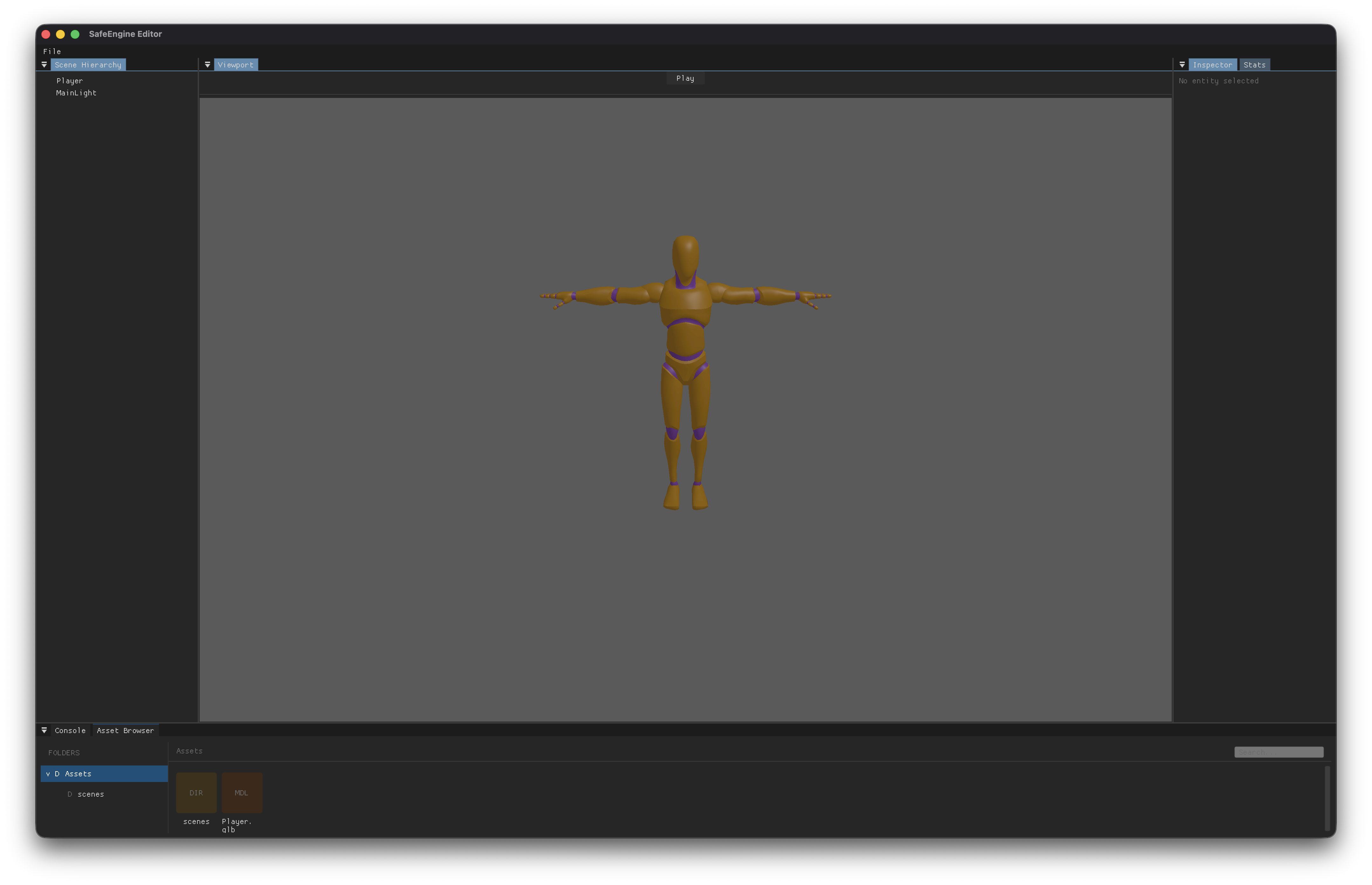
The splits happen in order:
- Bottom — 25% of root height → Asset Browser + Console (tabbed)
- Left — 20% of remaining width → Scene Hierarchy
- Right — 25% of remaining width → Inspector + Stats (tabbed)
- Center — What remains (~55%) → Viewport
All panels are dockable — you can drag tabs to rearrange, undock into floating windows, or collapse panels. ImGui's .ini file saving is disabled, so the layout resets on restart.
Menu Bar
The editor has a single File menu:
Shortcuts are handled via ImGui's IO system after menu bar rendering (io.KeyCtrl, ImGui::IsKeyPressed()).
Panels
Main Loop
Each frame, the editor:
- Polls GLFW events and checks for close requests (intercepts if scene is dirty)
- Detects play mode changes — snapshots the scene on play, restores on stop
- Renders the 3D scene into the viewport framebuffer
- Begins the ImGui frame and dockspace
- Draws the menu bar and all panel UIs
- Shows the close confirmation dialog if needed
- Finalizes ImGui rendering and swaps buffers
Key Features
- Play mode — Snapshots scene state before play, restores on stop (details)
- Drag-and-drop — Drag assets from the browser onto Inspector fields (model paths, audio clips, scripts)
- Procedural primitives — Create Box, Sphere, Plane, Cylinder, and Capsule from the Scene Hierarchy context menu
- Component registry — Extensible drawer system with 15+ registered components and colored headers
- Dark theme — VS Code-inspired color scheme with sRGB→linear conversion for correct framebuffer rendering (details)
- HiDPI support — Viewport framebuffer scales to native resolution on Retina displays